
Admin Portal
System configuration for Data Services Cloud Console (DSCC).

Collaboration
Iteration
Design
Project
Overview
Context
The HPE GreenLake Dedicated Platform provides fully offline cloud management for secure, isolated data centers. Historically, configuring this platform with the Data Services Cloud Console (DSCC) was a complex process that relied entirely on a text-based user interface (TUI) and nested command-line interface (CLI) menus.
The problem
Managing the HPE GreenLake Dedicated Platform via a text-based CLI introduced severe risks due to a total lack of visual feedback and safety guardrails. In isolated, air-gapped data centers, a single typing mistake in a critical setting could instantly lock administrators out or crash vital systems. Because the text interface offered no input validation and gave opaque error messages, routine maintenance required expert-level skills and forced admins to blindly troubleshoot complex code, creating costly operational bottlenecks.
Role
As the Co-UX Designer on this project, I stepped in to lead the design continuity during the Lead Designer's planned absence, successfully iterating on and finalizing all remaining design deliverables.
Timeline
Oct. 2025 (1 sprint)
Discovery
Design handover
To maintain design continuity during the Lead Designer’s leave without resetting the project timeline, I bypassed foundational research in favor of tactical, rapid-alignment discovery. I initiated comprehensive handover sessions with both the lead designer and key stakeholders, allowing me to transfer critical system knowledge, validate the current design direction, and successfully unblock the next phase of development.
What I learned
The Hardware Interdependence of DSCC
To configure Data Services Cloud Console (DSCC) you must explicitly bridge a physical storage array (like an HPE Alletra MP). It cannot function as an isolated software application. It requires a strict hardware-to-software framework of connecting the two together. Configuration requires a two-way handshake where the physical hardware requests a certificate, generates a subscription key, and must be "claimed" and assigned inside the DSCC dashboard.
Design direction
To transition system configuration away from the legacy text-based interface, the new design introduces a centralized, GUI-driven Administrator Portal. This portal serves as the single source of truth for platform management, allowing administrators to securely configure global settings, orchestrate hardware connections, and monitor system health from a unified visual dashboard.
Moving forward
Once I developed a comfortable understanding of the system and validated the design approach, I had the necessary insights to confidently move forward into the design phase with the following user stories and functional requirements.
Defining
User stories
Following the rapid discovery phase I drafted the following main user stories.


Functional requirements
System Initialization & User Interface (UI)
-
FR-1.1: The system shall provide an on-premises Graphical User Interface (GUI) to initiate the system configuration of the dedicated platform.
-
FR-1.2: The Admin Portal GUI shall prominently display the current system firmware/software version that the dedicated platform is running.
-
FR-1.3: The Admin Portal GUI shall include a direct navigational link/shortcut to open and access the main dedicated platform workspace.
Configuration Workflow & Data Integrity
-
FR-2.1: The GUI shall guide the user through a guided, step-by-step system configuration wizard.
-
FR-2.2: The system shall include an auto-save mechanism that automatically preserves the user's configuration progress at each step.
-
FR-2.3: The system shall present a comprehensive summary screen allowing users to review and modify all inputted system configurations prior to final submission.
Installation Tracking & Error Handling
-
FR-3.1: Upon final configuration completion, the GUI shall display a real-time installation progress monitor.
-
FR-3.2: If an error occurs during the installation process, the system shall provide an automated option for the user to generate and download a diagnostic support bundle.
Ideation
Feedback passed down during the design handoff
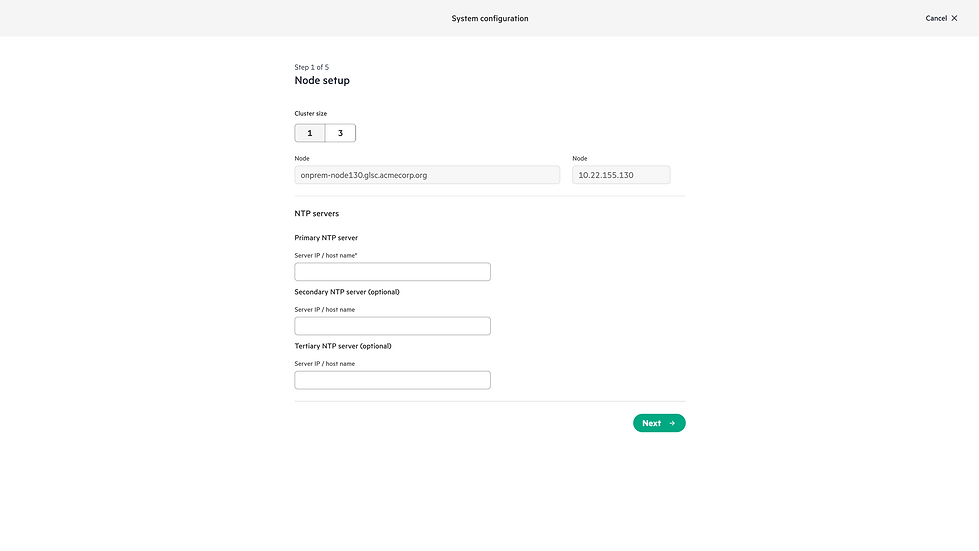
While the lead designer's mid-fidelity wireframes established a solid structural foundation, my role focused on expanding the designs to accommodate edge cases, define robust error-handling states, and align with our design system.
%20-%20all%20blank.png)
Node setup error-handling use cases
There are several errors that could occur if the administrator is trying to setup more than one 1 cluster. Collaborating with engineering to identify these error cases led to the following design iterations.
Iteration:





Same error-handling use cases apply to the Cluster FQDN input field.
Transition loading state
Because all input fields in step 3 are automatically pre-populated, engineering anticipates backend latency during the data-fetching process. To address this, there needs to be a loading state to ensure the interface remains communicative, effectively managing user expectations during the data payload retrieval.
Design system v-2 updates
Hi-fidelity wireframes need to be designed using the newly release v-2 design theme and system.
Layout feeback
During internal reviews, stakeholders noted that the high volume of content in the step 5 review layout made the page too long. Consequently, the design team was challenged to explore alternative layouts or design patterns to consolidate the information more efficiently.

Iteration:

Iteration:


Next steps & Retrospective
Next steps
-
The implementation of this feature enables other workflows such as upgrades and backup & recovery to begin.
-
After feature goes general available and users have configured and installing their GreenLake Dedicated Platform system through the Admin Portal submit a request to the research team to gather initial feedback with the UX.
Contraints
-
Since Scope Group availability is tied directly to the IAM 2.0 release:
-
Existing Workspaces: Retain legacy RRPs until migrated to IAM 2.0.
-
New Workspaces: Automatically provisioned with IAM 2.0 and Scope Groups by default.
-
Retrospective
-
Reflecting on the challenges of joining this project at the halfway point, my immediate hurdle was getting up to speed on a highly complex domain, the legacy system, and our ultimate project goals. I dedicated my first few days to deeply reviewing the existing assets and asking clarifying questions with stakeholders. This active alignment was critical; it allowed me to fully absorb the scope of the system and confidently step into the lead design role with minimal friction.
-
When the lead designer returned and reviewed the final deliverables, the designs met and exceeded their expectations. It was incredibly rewarding to hear that my efforts to smooth out the transition, map complex system dependencies, and harden the UI components successfully carried the project forward without missing a beat.